In 2026, smartphones can create 3D models from photos. Meshy AI, Polycam, RealityScan and others support photogrammetry and AI modeling for AR, games and 3D printing.
A high-end desktop PC is no longer required for every photo-to-3D workflow. In 2026, a smartphone can capture an object, upload the images through a mobile browser or dedicated app, and generate a draft 3D model through AI or photogrammetry.
For mobile creators, the right tool depends on whether it converts one image or reconstructs an object from multiple photographs, how long uploads and processing take, which formats it exports, the quality of its textures, and whether the result is intended for AR, games, e-commerce, or 3D printing.
Here are seven options worth trying. Meshy AI appears first as a broad browser-based choice.
1. Meshy AI – Best Overall for Mobile Photo-to-3D
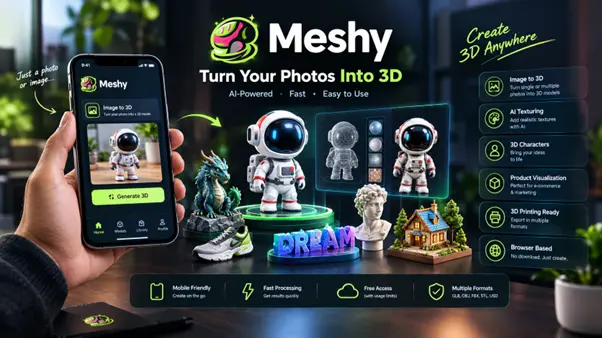
Meshy AI can turn a photograph into a draft 3D model through a mobile browser, so users do not need a powerful computer or a desktop installation for the initial generation step.
Its image-to-3D workflow is useful for products, collectibles, characters, props, and other creative assets. A strong single image can provide a starting point, while carefully prepared references can help when more visual information is needed.
Meshy also provides AI texturing and export options for further work in creative applications, game engines, AR workflows, and 3D-printing tools.
For mobile creators, its main advantage is convenience and workflow breadth. Its limitation is that browser-based generation depends on connectivity and is not a substitute for accurate multi-view scanning.
2. Polycam – A Mobile Leader in Photogrammetry
The focus of Polycam is the scanning and photogrammetry of the real world. Because it is centered on this feature, this makes it quite useful to the smartphone user who wishes to scan any 3-dimensional object and surrounding space.
Compared to 3-D creation of images from only one picture through AI, photogrammetry generally takes several photos. The advantage is that the resulting reconstruction can contain more information about the object's actual shape.
Creators can use mobile scanning for objects, spaces, and reference material. The approach can be particularly useful for AR projects, digital documentation, and real-world asset capture.
3. RealityScan – Good for Smartphone Object Capture
RealityScan uses photogrammetry to reconstruct an object from photographs. Users capture the object from multiple angles, and the software turns the overlapping images into a 3D model. This process is effective when more accuracy than stylistic interpretation is needed.
This approach is useful when physical accuracy is more important than creating a stylized interpretation. Good lighting, consistent camera movement, and sufficient overlap between photographs are important for obtaining better results.
4. KIRI Engine – Multi-View and 3D Scanning Option
KIRI Engine provides mobile-friendly 3D scanning and photogrammetry workflows. This may also be beneficial to creators who may wish to photograph a real physical object rather than relying on one interpretation derived by AI.
Although multi-view workflows require more images than single-view generation, they can reconstruct more of the object's actual geometry. They are suitable for asset creation, visualization, AR, and other 3D projects.
5. Luma AI – Useful for Creative 3D Capture
Luma AI offers tools for turning visual input into 3D and immersive content. It may suit creators exploring concepts, digital worlds, or visual experiments.
Output quality depends on input quality. Capture photographs or video with sufficient coverage and stable lighting.
For creators focused on quick concept development rather than technically perfect manufacturing models, this type of workflow can be especially useful.
6. Tripo – Fast AI Image-to-3D Generation
Tripo is a browser-based image-to-3D option that does not require traditional modeling skills. It can be faster than photogrammetry because it may work from a single reference image, but unseen geometry is inferred and may not match the real object.
It can be useful for rough game props and concept assets, but topology, textures, and scale should be reviewed before production use.
7. Blender – Best for Mobile-to-Desktop Refinement
Blender is not a mobile photo-to-3D application, but it deserves a place in a modern creator workflow because it provides extensive tools for editing generated models.
A smartphone user can generate or scan an asset using one of the tools above and then move the model into Blender for detailed refinement. Artists can clean geometry, modify topology, adjust UVs, optimize polygon counts, and prepare models for specific applications.
Blender is most useful after generation, when a model needs cleanup and adjustment before entering a game engine or 3D-printing workflow.
Single Image vs Multi-View vs Photogrammetry
The correct solution depends on your project.
Single-image AI generation is often the fastest option for concepts, game props, stylized objects, and experiments. However, the AI must estimate unseen geometry.
Multi-view AI generation provides additional reference information by using several photographs. This can improve the representation of complex objects while remaining more convenient than traditional modeling.
Mobile photogrammetry usually requires the most photographs, but it is often preferable when a real-world object must be reconstructed more accurately. It is well suited to AR, documentation, and real-world asset capture.
What Should Mobile Creators Look For?
There are a few things to think about before you choose a tool: photo resolution requirements, what works well for the mobile browser version, what the generation speed is, and the quality of the texture and whether that will export to the format you need and go where you want. Will AR work correctly as the platform is designed for the type of format, workflow and targeting device? Is the mesh good for 3d printing; have you checked that the output is suitable for your slicer?
Are the polygon count, textures, UVs, and optimization adequate to get what you want in game development?
There's a real advantage to using something that runs solely on the browser; like Meshy AI, as it doesn't demand a particularly fast computer, only a device capable of acting as a decent mobile browser (ordinary smartphones and laptops suffice).
Conclusion
Smartphones have become accessible entry points to 3D creation. Users can generate a themed asset from one image or reconstruct a real object from multiple photographs through photogrammetry.
For convenient browser-based generation, Meshy AI offers a broad workflow for turning a mobile image into a textured 3D model without high-end local hardware. Polycam, RealityScan, and KIRI Engine may be better choices when accurate physical capture is the priority.
With smart-phones having increasingly advanced cameras, and 3D AI rapidly evolving, you should expect photo-to-3D methods to remain increasingly relevant for many AR, gaming, and e-commerce applications, as well as for digital art and 3D printing.
Tetszett a cikk? Kövess minket Google Híreiben!A Telefonguru legfrissebb híreit egyenesen a Google feededbe hozzuk
A drágább USB-C kábel nem feltétlenül jelent gyorsabb töltést vagy jobb adatátvitelt. Sok esetben egy néhány ezer forintos, megfelelő tanúsítvánnyal rendelkező modell pontosan ugyanazt tudja, mint a jóval drágább prémium változatok.
Vannak felhasználók, akik annyira elégedettek a 2024-es csúcsmodellel, hogy még az akkumulátor cseréjét is vállalnák ahelyett, hogy új telefonra költenének.
Az új Gyorspanel nemcsak frissebb külsőt kapott, hanem jóval szabadabban testreszabható, így a Galaxy tulajdonosok saját igényeikhez igazíthatják a fontos kapcsolók és vezérlők elrendezését.
A Samsung új rendszere mindhárom generációra elhozza a Galaxy AI több újdonságát, a kamerás lehetőségek terén azonban komolyabb eltérések mutatkoznak. A Galaxy S24 ráadásul két értesítéskezelési fejlesztésből is kimarad, míg bizonyos kamerás extrák továbbra is a Galaxy S26 sajátjai maradnak.
A Samsung, a Google és az Apple is a mesterséges intelligenciát állítja új készülékei középpontjába. Mennyire fontosak Önnek a telefon AI-funkciói vásárláskor?